
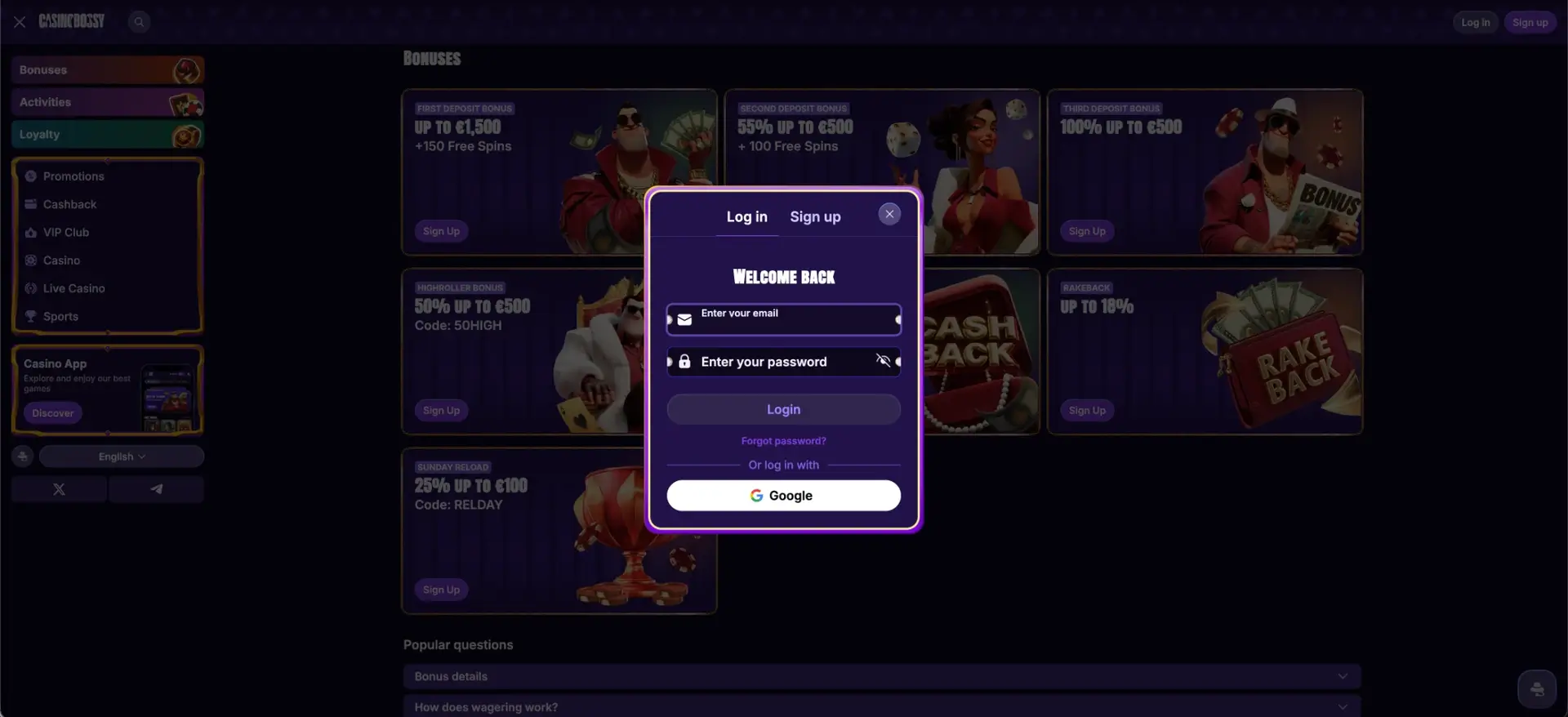
To log in to CasinoBossy, open casinobossyca.org, select Log in in the top-right corner, enter the email address and password used at registration, and confirm - or sign in with a linked Google account. A single set of credentials works across desktop, tablet and mobile, and once signed in a player reaches the full game catalogue, bonuses, sportsbook, cashier and loyalty tracker. This page covers the CasinoBossy login step by step, plus password recovery, mobile access, verification and the most common sign-in issues.
Login is protected by TLS/SSL encryption, and accounts can add two-factor authentication (2FA) for an extra layer of security. A deeper identity check is only requested at the first withdrawal, so signing in day to day stays quick.
| Login essentials | Details |
|---|---|
| Where to log in | casinobossyca.org - Log in button, top-right |
| Login method | Email and password, or Google sign in |
| Two-factor authentication | Optional, set in security settings |
| Password reset | Forgot password link on the login form |
| Device support | Desktop, tablet, mobile browser, installed web app |
| Session security | TLS/SSL encryption, activity monitoring |
| When verification appears | At first withdrawal (KYC) |
| Currency | CAD (also EUR, USD) |
| Support | 24/7 live chat and email |
How to log in to CasinoBossy
The login form opens in a pop-up window with a "Welcome back" header and two fields. Signing in takes only a few steps:
- Open casinobossyca.org in a browser.
- Select the Log in button in the top-right corner of the page.
- Enter the email address used during registration.
- Type the password - use the eye icon to reveal it and check for typos.
- Complete two-factor authentication if it is enabled on the account.
- Select Login and wait for the dashboard to load without refreshing.
Players who registered with Google can skip the password entirely and use the "Or log in with Google" button at the bottom of the form.
Creating an account first
A login only works once an account exists, so new players start from the Sign up tab in the same pop-up. Registration is short and asks for the minimum details:
- Select Sign up in the top-right corner or switch to the Sign up tab.
- Enter an email address and create a password.
- Add a promo code in the optional field if one applies.
- Confirm you are 18 or older and accept the terms and privacy policy.
- Complete sign-up, or register with a Google account.
An account can be opened with just an email, though full details are needed to qualify for the welcome package. After registration, logging in is a two-step process from any device.
Secure login practices
A few habits keep a CasinoBossy account safe from unauthorized access. These matter most on shared or public devices:
- Turn on two-factor authentication in the security settings.
- Use a unique password that is not reused on other sites.
- Avoid saving login details in public or shared browsers.
- Log out fully after each session on a device that others can reach.
The platform also monitors logins for unusual activity, so an unexpected sign-in attempt can be flagged and addressed.
Password recovery
A forgotten password does not require contacting support. The login form has a built-in reset link:
- Open the login pop-up and select Forgot password? below the fields.
- Enter the email address linked to the account.
- Open the reset email and follow the instructions to set a new password.
- Return to the login form and sign in with the new credentials.
If the reset email does not arrive, checking the spam folder and confirming the correct email address resolves most cases.
Mobile login
The login process is identical on mobile, whether through a browser or the installed web app. The same email, password or Google option applies:
- Open casinobossyca.org in a mobile browser, or tap the home-screen icon if the web app is installed.
- Select Log in and enter the account details, or use Google sign in.
- The dashboard, cashier and games load in the same layout as desktop.
Adding the site to the home screen turns login into a one-tap action, without opening a browser first each time.
Troubleshooting common login issues
Most sign-in problems come down to a handful of causes, and each has a quick fix. The sections below cover the usual ones.
Incorrect credentials
An "incorrect email or password" message usually points to a typo or the wrong email. Reveal the password with the eye icon, confirm the email is the one used at registration, and check that Caps Lock is off before trying again.
Browser or cache issues
If the login page loads but the form does not respond, clearing the browser cache and cookies and reloading usually helps. Disabling script-blocking extensions or switching browsers resolves cases where a session fails after submission.
Two-factor code fails
When a 2FA code is rejected, confirm the device clock is set to the correct time, request a fresh code, and enter it promptly before it expires. Repeated failures can be raised with live chat.
Account temporarily locked
Several failed attempts can trigger a short lock as a security measure. Waiting a few minutes, resetting the password, or contacting support restores access.
What you access after login
Signing in opens the full personal account, with every tool grouped into a few clear areas. The main dashboard sections are:
- Wallet - real-time balance, plus one-click deposits and withdrawals.
- History - a cashback and bonus tracker sortable by type, status and period.
- Profile - loyalty progress in Wager and Deposit Points, plus responsible-play controls.
- Promotions - active offers, bonus codes and tournament opt-ins.
From the same account, players can move straight into the casino lobby, the live floor or the sportsbook without a second login.
Account verification (KYC)
CasinoBossy keeps registration light and applies its main identity check at the first withdrawal rather than at sign-up. When that check appears, the account holder is asked to confirm identity and address:
- A passport or national ID.
- Proof of address, such as a recent utility bill.
- Copies of any cards used to deposit.
In some cases a selfie with a document or a short verification call may be requested. Documents in the Latin or Cyrillic alphabet are accepted, and no cash-outs are processed until verification is complete.
Frequently asked questions
The questions below cover the login points Canadian players ask about most.
How do I log in to CasinoBossy?
Open casinobossyca.org, select Log in, enter the registered email and password, complete 2FA if enabled, and select Login. Players who signed up with Google can use the Google button instead.
I forgot my CasinoBossy password - what do I do?
Select "Forgot password?" on the login form, enter the account email, and follow the reset link sent by email to set a new password.
Can I log in to CasinoBossy on mobile?
Yes. Login works in any mobile browser and through the installed web app, using the same email, password or Google option as desktop.
Why can't I log in to my account?
The usual causes are a mistyped password or email, cached browser data, a failed 2FA code, or a temporary lock after several attempts. Clearing the cache, resetting the password, or contacting live chat resolves most cases.
Is CasinoBossy login secure?
Login runs over TLS/SSL encryption, supports two-factor authentication, and is backed by activity monitoring. A one-time KYC check is applied at the first withdrawal.
Do I need to verify my account to log in?
No. Logging in only needs an email and password. Identity verification is requested later, at the first withdrawal, not at login or registration.
Play responsibly
Set limits before you play, never chase losses and check the latest bonus and withdrawal terms on the operator website.